
CSS Micro-Interaction & Animation Builder: The Complete Beginner's Guide
Modern websites are no longer static. Every successful website today uses micro-interactions to make the user experience smoother, more engaging, and visually appealing.
Whether it's a button that gently expands on hover, a card that floats when focused, or an animated loading element, these subtle effects improve usability and keep visitors engaged.
The challenge? Writing CSS animations manually can be time-consuming and confusing—especially for beginners.
That's where ToolLok's CSS Micro-Interaction & Animation Builder comes in.
Instead of writing complex keyframes by hand, you can generate beautiful CSS animations visually and copy production-ready code in seconds.
What Is a CSS Micro-Interaction?
A micro-interaction is a small animation that responds to a user's action.
Examples include:
- Hover animations
- Loading indicators
- Animated buttons
- Card lift effects
- Floating icons
- Progress animations
- Toggle switches
- Notification effects
These tiny animations make websites feel modern and interactive.
Why Micro-Interactions Matter
Well-designed animations can:
- Improve user engagement
- Increase click-through rates
- Guide user attention
- Provide visual feedback
- Make interfaces feel premium
- Improve overall user experience
Big companies like Apple, Google, Stripe, and Notion rely heavily on subtle animations to enhance their products.
What Is ToolLok's CSS Micro-Interaction & Animation Builder?
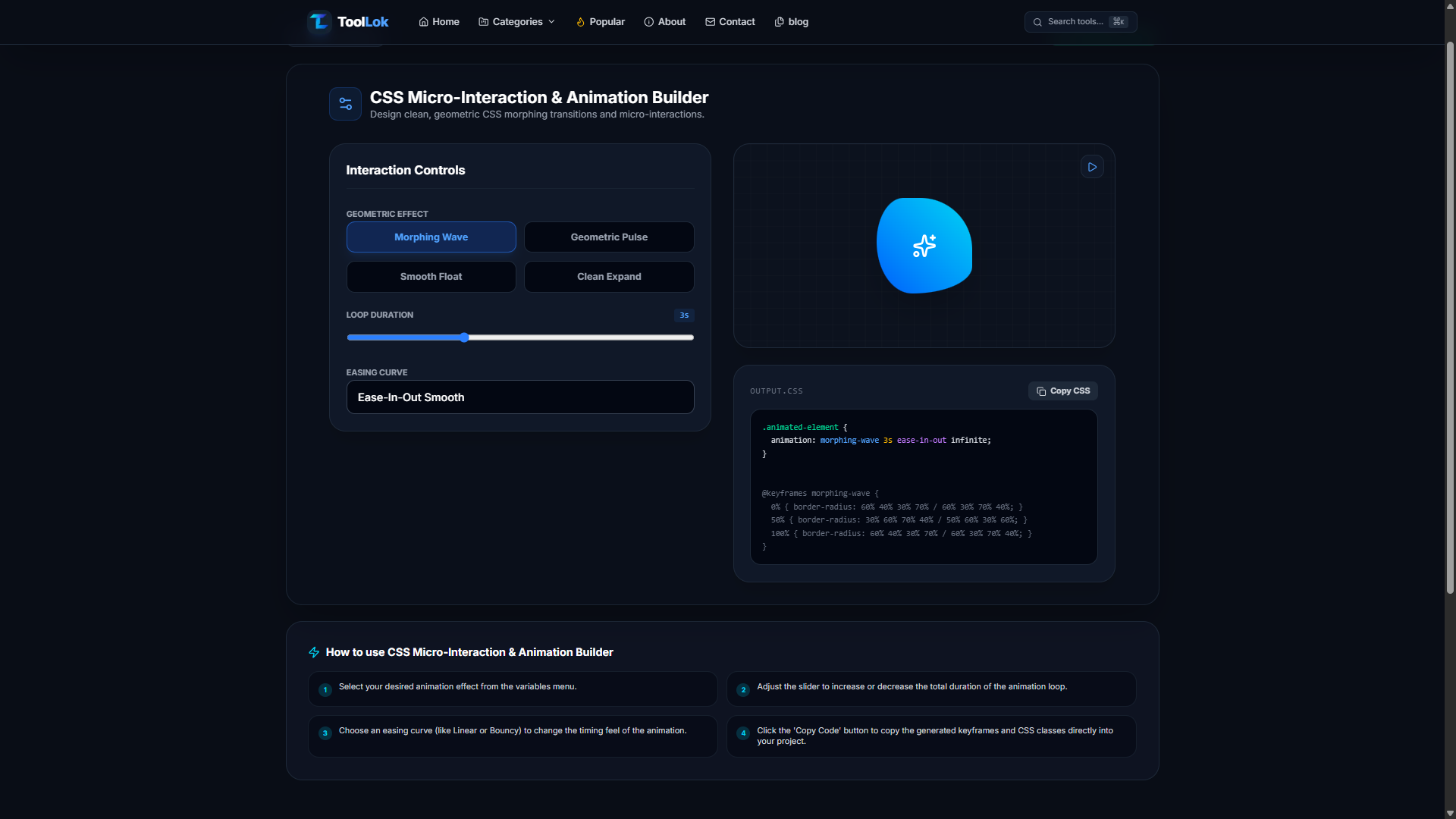
ToolLok's CSS Micro-Interaction & Animation Builder is a browser-based tool that helps you generate lightweight CSS animations without writing complex code.
Simply choose an animation, adjust the settings, preview the effect, and copy the generated CSS.
Everything runs locally in your browser—no installation or coding experience required.
Key Features
🎨 Live Animation Preview
See every animation update instantly before copying the code.
🌊 Multiple Animation Styles
Choose from animations such as:
- Morphing Wave
- Geometric Pulse
- Smooth Float
- Clean Expand
More animation presets can be added over time.
⏱ Adjustable Animation Duration
Use the slider to control how fast or slow the animation should play.
Perfect for creating subtle or dramatic effects.
🎯 Easing Curve Selection
Choose different easing options to control animation timing.
Examples include:
- Ease
- Ease-In
- Ease-Out
- Ease-In-Out
- Linear
📋 One-Click CSS Copy
Once you're satisfied with the animation, copy the generated CSS instantly and paste it directly into your project.
⚡ Lightweight Output
The generated CSS is clean, optimized, and free from unnecessary code.
🌐 100% Browser-Based
No software installation.
No sign-up.
No server processing.
Everything runs locally.
How to Use the CSS Animation Builder
Using the tool takes less than a minute.
Step 1
Choose your preferred animation effect.
Examples:
- Morphing Wave
- Smooth Float
- Geometric Pulse
Step 2
Adjust the animation duration using the slider.
Step 3
Select an easing curve that matches your desired motion.
Step 4
Preview the animation in real time.
Step 5
Click Copy CSS.
Paste the generated CSS into your project.
Done!
Example Generated CSS
.animated-element{
animation:morphing-wave 3s ease-in-out infinite;
}

@keyframes morphing-wave{

0%{
border-radius:60% 40% 30% 70%;
}

50%{
border-radius:30% 60% 70% 40%;
}

100%{
border-radius:60% 40% 30% 70%;
}

}
Who Should Use This Tool?
This tool is perfect for:
- Frontend Developers
- UI Designers
- Web Designers
- React Developers
- Next.js Developers
- Tailwind CSS Users
- Students
- Freelancers
- Agencies
- SaaS Builders
Common Use Cases
Use these animations for:
- CTA Buttons
- Cards
- Pricing Sections
- Hero Images
- Icons
- Logos
- Dashboard Widgets
- Loading Screens
- Navigation Menus
- Landing Pages
Benefits of Using ToolLok's Animation Builder
✅ No coding required
✅ Instant preview
✅ Lightweight CSS
✅ Production-ready code
✅ Works with Tailwind CSS
✅ Beginner-friendly
✅ Free to use
✅ Mobile-friendly
Best Practices for CSS Animations
To keep your website fast and user-friendly:
- Keep animations subtle and purposeful.
- Avoid animating too many elements at once.
- Use
transformandopacitywhen possible for smoother performance. - Choose animation durations between 200ms and 600ms for most UI interactions.
- Respect users who prefer reduced motion by supporting the
prefers-reduced-motionmedia query. - Test animations on both desktop and mobile devices.
Common Mistakes to Avoid
❌ Overusing animations on every element
❌ Extremely long animation durations
❌ Flashy effects that distract users
❌ Ignoring mobile responsiveness
❌ Creating animations without visual feedback or purpose
Frequently Asked Questions
Is this CSS Animation Builder free?
Yes. You can generate and copy CSS animations for free.
Do I need JavaScript?
No.
The generated animations use pure CSS.
Does it work with Tailwind CSS?
Yes.
You can use the generated keyframes alongside Tailwind CSS classNamees.
Can beginners use this tool?
Absolutely.
The interface is designed for users of all experience levels.
Will the generated CSS work in modern browsers?
Yes.
The generated CSS is compatible with all major modern browsers.
Final Thoughts
Beautiful animations no longer require hours of manual coding.
With ToolLok's CSS Micro-Interaction & Animation Builder, you can create professional-looking CSS micro-interactions in just a few clicks. Whether you're building a landing page, portfolio, SaaS dashboard, or eCommerce site, subtle animations can make your interface feel polished and engaging.
If you're looking for a fast, beginner-friendly way to create reusable CSS animations, this tool is a great place to start.
🚀 Try the Tool
Ready to create your own animations?
👉 Use the CSS Micro-Interaction & Animation Builder on ToolLok and generate clean, production-ready CSS in seconds.