
Working with multiple PDF documents can become inconvenient when important information is spread across several separate files. Combining related documents into a single PDF can make files easier to organize, share, archive, and manage.
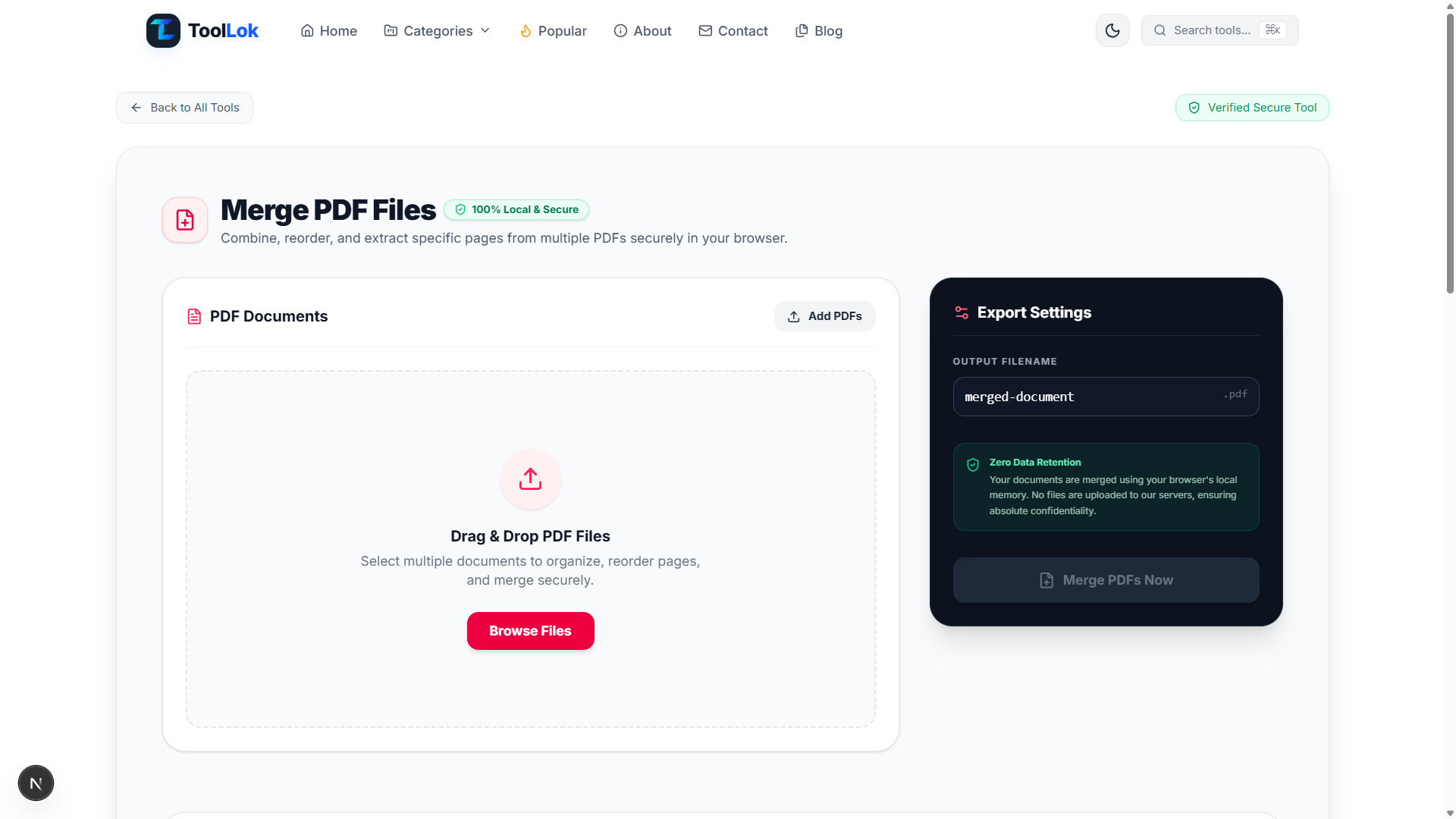
ToolLok's Merge PDF Files is a free browser-based PDF tool that helps users combine multiple PDF documents into a single file. It also provides options for organizing document order and extracting specific pages during the PDF management workflow.
The tool is designed around a simple workflow: add multiple PDF files, organize the documents and pages, configure the output filename, and generate the final merged PDF. The interface is suitable for students, professionals, developers, businesses, researchers, and anyone who regularly works with PDF documents.
Important: Always review the final merged document before sharing or submitting it, especially when working with important business, legal, financial, academic, or other sensitive documents.
What Is a PDF Merger?
A PDF merger is a tool that combines two or more PDF documents into a single PDF file. Instead of managing multiple separate documents, users can create one organized document containing the required pages and information.
PDF merging can be useful when working with:
- Business documents
- Invoices and receipts
- Reports
- Contracts
- Research papers
- Academic assignments
- Project documentation
- Scanned documents
- Presentation documents
- Multiple-page forms
Combining these documents into one PDF can make them easier to download, send, store, print, and archive.
Why Merge Multiple PDF Files?
Managing a large collection of separate PDF files can make document organization unnecessarily difficult. A PDF merger provides a simple way to consolidate related documents into one file.
Merging PDFs can help you:
- Combine multiple PDF documents into one file.
- Organize documents in a specific order.
- Create a single file for sharing.
- Keep related documents together.
- Prepare documents for printing.
- Organize project documentation.
- Combine reports and supporting files.
- Create a consolidated PDF archive.
- Reduce the number of individual PDF files you need to manage.
Key Features of ToolLok Merge PDF Files
1. Merge Multiple PDF Documents
The primary function of the tool is combining multiple PDF documents into a single PDF. Users can add the required files and create one consolidated document instead of handling each PDF separately.
2. Drag and Drop PDF Files
ToolLok provides a convenient Drag & Drop PDF Files workspace. Users can drag supported PDF documents directly into the browser interface or use the Browse Files option to select documents from their device.
3. Add Multiple PDFs
The Add PDFs option allows users to add multiple PDF documents to the workspace. This is useful when several files need to be combined into one final document.
4. Reorder PDF Documents
Document order can be important when creating a professional PDF. ToolLok's PDF workflow is designed to allow users to organize and reorder documents before creating the final merged file.
Reordering can be useful when combining reports, chapters, invoices, project documents, or other files that need to follow a specific sequence.
5. Extract Specific PDF Pages
The tool also supports workflows involving specific pages from PDF documents. This can be useful when only selected pages from a larger document are required for the final PDF.
Instead of keeping unnecessary pages in the final document, users can organize the required content as part of the PDF merging workflow.
6. Local Browser Processing
ToolLok's Merge PDF Files interface is designed around browser-based local processing. The interface indicates 100% Local & Secure processing and Zero Data Retention.
This approach provides a privacy-focused workflow for users who want to process documents directly within their browser rather than relying on a traditional remote document-processing workflow.
7. Zero Data Retention Workflow
The interface highlights a Zero Data Retention approach and indicates that documents are processed using the browser's local memory. This is particularly useful for users who prefer a local workflow when handling documents.
Organizations should still follow their own security policies and document-handling requirements when working with confidential or highly sensitive information.
8. Custom Output Filename
ToolLok provides an Output Filename setting that allows users to specify the name of the resulting PDF. This makes it easier to create organized files instead of relying on an automatically generated filename.
A descriptive filename can also make documents easier to identify when they are downloaded, shared, or stored for future use.
9. Secure PDF Merging
The tool is designed to provide a secure browser-based PDF merging workflow. The interface combines local processing with a privacy-focused design so users can organize PDF documents directly from their browser.
10. Simple PDF Management Interface
The Merge PDF Files interface separates the document workspace from export settings. This makes it easier to add PDFs, organize documents, configure the output filename, and generate the final document.
How to Merge PDF Files Online
- Open the Merge PDF tool. Open ToolLok's Merge PDF Files tool in your browser.
- Add your PDF documents. Click Browse Files or use the Add PDFs option to select the PDF files you want to combine.
- Organize your documents. Arrange the PDF files in the order required for the final document.
- Select the required pages. When necessary, organize or extract specific pages that should be included in the final PDF.
- Choose an output filename. Enter a descriptive filename for the merged PDF.
- Merge the PDFs. Start the PDF merging process.
- Review the final document. Open the resulting PDF and verify that the pages appear in the correct order.
How Does PDF Merging Work?
A PDF contains individual pages organized within a document structure. A PDF merging process combines pages from multiple source documents into a new PDF document while maintaining their intended order.
For example, imagine you have three documents:
- Project Report.pdf
- Project Images.pdf
- Project Appendix.pdf
Instead of sending three separate files, you can combine the relevant documents into a single project PDF. The resulting file can then be shared or archived as one consolidated document.
PDF Merger for Students
Students frequently work with assignments, research papers, notes, scanned pages, reference materials, and supporting documents. These files may be stored as separate PDFs and can become difficult to manage.
A free PDF merger for students can help combine related academic documents into one organized file before submitting or sharing them.
- Combine assignment pages.
- Merge research documents.
- Combine scanned notes.
- Organize project documentation.
- Merge supporting reference files.
- Create a single submission PDF.
PDF Merger for Businesses
Businesses regularly manage invoices, reports, contracts, forms, receipts, proposals, and other PDF documents. Combining related files can simplify document sharing and organization.
A business PDF merger can be useful when preparing consolidated reports, document packages, client submissions, or internal records.
PDF Merger for Developers
Developers can also encounter PDF files when building applications, testing document workflows, preparing technical documentation, or managing generated reports.
A browser-based PDF merging tool provides a convenient way to combine documents during development and testing without requiring a dedicated desktop PDF application.
PDF Merger for Document Organization
One of the most useful applications of PDF merging is document organization. Instead of keeping many related files separately, users can create a consolidated document containing the information they need.
This can be especially useful for long-term archiving, project documentation, administrative records, research materials, and personal document management.
When Should You Extract Specific PDF Pages?
Sometimes an entire PDF document is not required. A large document may contain only a few pages that are relevant to a particular task.
Extracting or selecting specific pages can help create a more focused final PDF by removing unrelated content from the document package.
For example, a 50-page report may contain only five pages that are relevant to a particular project. Selecting the required pages can make the resulting document easier to review and share.
Why Reordering PDF Pages Matters
Correct page order is important when creating professional documents. Even if all required pages are included, an incorrect sequence can make a document confusing or difficult to understand.
Reordering PDF documents before merging helps ensure that the final file follows the intended structure.
- Place a cover page first.
- Keep chapters in the correct order.
- Place supporting documents after the main report.
- Organize invoices chronologically.
- Arrange scanned pages correctly.
- Place appendices at the end.
Advantages of Local PDF Processing
Browser-based local processing can provide several practical benefits for document workflows. Users can work with documents directly from their browser without needing to install dedicated PDF software.
- No desktop PDF application required.
- Convenient browser-based workflow.
- Privacy-focused local processing.
- Simple drag-and-drop document management.
- Easy document organization.
- Fast access from modern browsers.
Local processing can also be useful for users who prefer not to transfer documents to a remote service during routine PDF management tasks.
Online PDF Merger vs Desktop PDF Software
Traditional desktop PDF applications can provide extensive document-management functionality, but they may require installation, updates, or paid subscriptions.
A browser-based PDF merger can be a convenient alternative when the primary requirement is combining, organizing, and preparing PDF documents quickly.
ToolLok focuses on providing these common PDF management functions through a simple browser interface.
Best Practices When Merging PDF Files
- Use descriptive filenames for your source documents.
- Arrange documents in the required order before merging.
- Remove unnecessary pages when appropriate.
- Review the final page sequence.
- Check that all required pages are present.
- Use a meaningful output filename.
- Open the final PDF before sharing it.
- Keep original documents when they may be required later.
- Follow organizational policies for confidential documents.
Common PDF Merging Use Cases
- Combine multiple reports into one PDF.
- Merge scanned documents.
- Combine project documentation.
- Create a single academic submission.
- Merge invoices and receipts.
- Combine contracts and supporting documents.
- Organize research papers.
- Create consolidated business reports.
- Combine selected pages from different PDF files.
- Prepare a document package for sharing.
- Archive related PDF documents together.
How to Create a Professional Merged PDF
Creating a professional merged PDF is more than simply combining files. The final document should have a logical structure and contain the correct pages in the correct order.
- Collect all required PDF documents.
- Remove documents that are not required.
- Identify pages that need to be included.
- Arrange documents in logical order.
- Choose a descriptive output filename.
- Merge the documents.
- Review the final PDF carefully.
- Store or share the completed document.
Who Can Use ToolLok Merge PDF Files?
ToolLok's Merge PDF Files tool is designed for a wide range of users who need to combine or organize PDF documents.
- Students
- Teachers
- Researchers
- Web developers
- Software developers
- Business professionals
- Freelancers
- Designers
- Content creators
- Office workers
- Project managers
- Small businesses
Privacy Considerations When Working With PDFs
PDF files can contain sensitive information such as names, addresses, financial information, business records, contracts, and other private data. Choosing an appropriate document-processing workflow is therefore important.
ToolLok's interface is designed around local browser processing and displays a Zero Data Retention privacy message. This provides a privacy-focused workflow for users who want to process documents locally in the browser.
However, users should always follow their organization's security policies and applicable data-handling requirements when processing confidential documents.
Why Use ToolLok's Merge PDF Files Tool?
ToolLok's Merge PDF Files tool combines PDF merging, document organization, page selection, custom output naming, and local browser processing into one simple interface.
Instead of installing dedicated software for a basic document-management task, users can open the tool in their browser, add multiple PDFs, organize the documents, and create a consolidated PDF.
The tool is especially useful for students, professionals, developers, businesses, researchers, and anyone who regularly needs a free online PDF merger.
Conclusion
Combining PDF documents is a common requirement for students, businesses, developers, researchers, and everyday users. A PDF merger makes it easier to consolidate multiple documents, organize their order, and create a single file for sharing or storage.
ToolLok's Merge PDF Files provides a convenient browser-based workflow for combining PDF documents, organizing pages, extracting relevant content, and configuring the final output filename. Its local processing and privacy-focused interface make it a practical option for routine PDF management.
Whether you need to combine reports, merge scanned documents, prepare an academic submission, organize project files, or create a consolidated business document, ToolLok provides a simple way to merge PDFs directly from your browser.
Merge, organize, and manage your PDF documents with ToolLok's free Merge PDF Files tool.