
Passwords and API keys are some of the most important security credentials used in modern applications.
A weak password or poorly generated secret can create unnecessary security risks for websites, APIs, databases, applications, and developer environments.
ToolLok's Password & API Key Analyzer combines password strength analysis, entropy estimation, cryptographic key generation, hashing, and security-oriented checks into one browser-based developer utility.
In this guide, you will learn what password entropy means, how password strength is evaluated, how cryptographic keys differ from passwords, how API keys should be generated, and how to use the ToolLok Password & API Key Analyzer.
⚠️ Important Security Note
Never paste a real production password, API key, private key, recovery code, or other sensitive credential into an unfamiliar website.
Use fictional or test values when experimenting with security tools.
🔐 Analyze a Test Password or Generate a Key
Explore password strength, entropy, character composition, hashes, and cryptographic key generation with ToolLok.
What Is a Password Analyzer?
A password analyzer evaluates characteristics of a password or test password string to provide an indication of its strength.
Instead of looking only at password length, a useful analyzer can consider multiple characteristics such as:
- Password length
- Uppercase characters
- Lowercase characters
- Numbers
- Symbols
- Estimated character pool
- Estimated entropy
- Potentially predictable patterns
These measurements help developers understand why a password may be considered stronger or weaker.
How Is Password Strength Measured?
Password strength is not determined by a single factor. A strong password should ideally be sufficiently long and difficult to predict.
Important characteristics include length, randomness, character diversity, and whether the password contains common or predictable patterns.
For example, simply adding a number to a common word does not necessarily create a strong password.
Weak vs Strong Password Examples
Password length and unpredictability both matter.
The following examples are fictional and should only be used for demonstration.
Example of a Weak Password
Consider this common example:
password123This password contains a common word followed by a predictable number pattern.
Although it contains letters and numbers, its predictable structure makes it a poor example of a secure password.
Example of a Random Test Password
A randomly generated test value can contain a broader combination of characters and be considerably less predictable.
T7#qL9!vR2@kX8$pA longer value containing a broader character set can provide a much larger theoretical search space.
However, password strength should not be judged from character types alone. Randomness, predictability, reuse, and the security of the authentication system also matter.
What Is Password Entropy?
Password entropy is commonly used as an estimate of the uncertainty or possible search space associated with a password.
Entropy is generally expressed in bits.
A simplified theoretical entropy estimate can be represented as:
Entropy ≈ Length × log₂(Character Pool)Increasing password length or increasing the number of possible characters can increase the theoretical search space.
However, a mathematical entropy estimate should not be interpreted as a guarantee that a password is secure.
Human-created passwords can contain predictable words, sequences, substitutions, or patterns that reduce their effective unpredictability.
What Is a Password Character Pool?
A character pool represents the possible characters that could be used when generating a password or key.
A generated value may use several character categories, including:
- Uppercase letters such as A-Z
- Lowercase letters such as a-z
- Numbers such as 0-9
- Symbols and special characters
When a generator uses a larger character pool together with sufficient length and secure randomness, the number of possible combinations can increase significantly.
Why Does Password Length Matter?
Password length is one of the most important characteristics to consider when creating credentials.
Compare these two fictional test values:
Short Test Password
A7#k9!Longer Test Password
A7#k9!vR2@xP8$qL5The second value contains substantially more characters. When values are generated randomly, additional length can significantly increase the theoretical number of possible combinations.
What Is an API Key?
An API key is a credential or identifier commonly used by applications when communicating with an API.
Depending on the service, API keys may be used for authentication, authorization, application identification, rate limiting, usage tracking, or access control.
When an API key provides access to protected resources, it should be treated as a sensitive credential.
Example of an API Key
An API service might provide a credential with a format similar to this fictional example:
tlk_test_7F9xK2mQ8vP4rL6nY3sDThis is only a fictional example. Never use example credentials as actual production API keys.
What Is Cryptographic Key Generation?
Cryptographic keys are values used by cryptographic algorithms for operations such as encryption, decryption, signing, and authentication.
Security-sensitive keys should be generated using an appropriate source of cryptographically secure randomness rather than predictable values such as timestamps or simple random sequences.
Modern browsers provide the Web Crypto API for security-related cryptographic operations and random-value generation.
const bytes = new Uint8Array(32);

crypto.getRandomValues(bytes);

console.log(bytes);
This example demonstrates how browser cryptographic randomness can be accessed through the Web Crypto API.
The exact key-generation method should always depend on the cryptographic algorithm and the application's requirements.
Standard, Hex and Base64 Key Formats
Cryptographic data can be represented using different text encodings depending on the application.
Hexadecimal Representation
Hexadecimal represents binary data using characters from
0-9 and a-f.
7f4a9c2e81b5d063f8a12c47e91d5b20Base64 Representation
Base64 is another common way of representing binary data using a text-based representation.
f0qcLoG10GP4oRxH6R1bIA==What Is Hashing?
Hashing transforms input data into a fixed-length output using a hash function.
Hash functions are commonly used for integrity checks, fingerprints, content identification, and other developer workflows.
ToolLok's Password & API Key Analyzer can display hash outputs such as SHA-256 and SHA-512 for analysis and development purposes.
SHA-256(input) → fixed-length hexadecimal digestHashing and encryption are not the same thing.
A cryptographic hash is designed as a one-way transformation, while encryption is designed to allow authorized recovery of plaintext using the appropriate key.
Is SHA-256 Suitable for Password Storage?
Developers should not assume that a general-purpose hash such as SHA-256 is automatically an appropriate password-storage mechanism.
Password storage normally requires a password-specific hashing or password-based key derivation algorithm designed to make large-scale password guessing more expensive.
The correct implementation depends on the application's architecture, threat model, and current security requirements.
How Should Developers Protect API Keys?
API keys should be handled carefully because accidentally exposing a credential can allow unauthorized access to the associated service.
- Do not hard-code sensitive production secrets in public repositories.
- Do not commit secrets to Git history.
- Use environment variables or an appropriate secrets-management system.
- Restrict permissions wherever the service supports granular access control.
- Rotate credentials when exposure is suspected.
- Use separate credentials for development and production.
- Monitor credential usage when the service provides monitoring.
A security analyzer can help developers understand credential characteristics, but secure application architecture is still necessary to protect secrets.
How to Keep API Keys Out of Source Code
Instead of directly placing a sensitive value inside application source code, developers commonly use environment variables or a dedicated secrets-management system.
Risky Pattern: Hard-Coding a Secret
const API_KEY = "your-production-api-key";Hard-coding production credentials inside source code increases the risk of accidentally exposing them through source control, logs, screenshots, or client-side bundles.
Better Pattern: Environment Variable
const API_KEY = process.env.API_KEY;The exact implementation depends on your framework and deployment environment.
Environment variables are not a complete secrets-management solution, but they can help prevent credentials from being directly embedded in application source code.
How Does ToolLok's Password & API Key Analyzer Work?
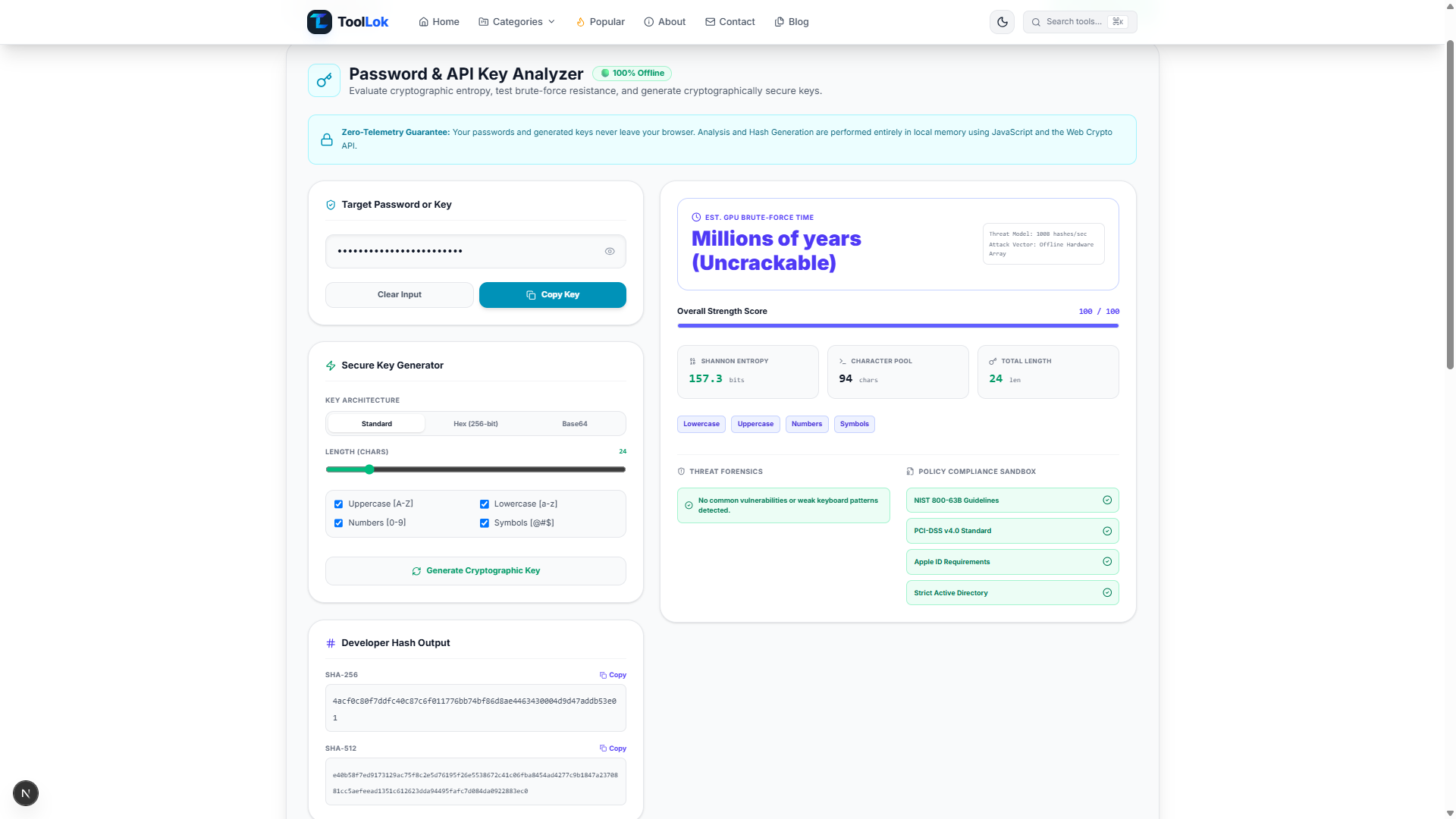
ToolLok's Password & API Key Analyzer is designed as a browser-based developer utility for password analysis, cryptographic key generation, and hashing-related workflows.
The tool interface includes password strength information, estimated entropy, character-pool information, secure key generation options, SHA-256 output, SHA-512 output, and security-oriented analysis.
The tool interface also states that password analysis and key generation are performed locally using JavaScript and the Web Crypto API.
It also displays a Zero-Telemetry Guarantee stating that passwords and generated keys do not leave the browser.
🔒 Use Test Credentials When Possible
Even when a tool is designed for local processing, users should follow good security practices and avoid entering real production credentials unless they have independently verified the implementation and trust model.
How to Use the Password & API Key Analyzer
You can use ToolLok's analyzer in a few simple steps.
- Enter a test password or key. Type or paste a fictional or test value into the Target Password or Key field.
- Review the password analysis. Inspect the available entropy, length, character pool, and strength information.
- Review security analysis. Check the available threat-forensics and policy-related information.
- Generate a cryptographic key. Use the Secure Key Generator to create a random key with the available architecture, length, and character options.
- Review hash output. Inspect SHA-256 and SHA-512 outputs when required for testing and development.
- Copy the required output. Use the available Copy controls to copy generated values into your development workflow.
🔑 Generate a Test Cryptographic Key
Explore key length, character sets, entropy, hashes, and security analysis in one developer-focused utility.
Password Security Checklist
When creating passwords for important accounts, consider the following security practices:
- Use a sufficiently long password or passphrase.
- Avoid predictable personal information.
- Avoid commonly used passwords.
- Do not reuse important passwords across services.
- Consider using a reputable password manager.
- Enable multi-factor authentication where available.
- Never share passwords or recovery credentials unnecessarily.
API Key Security Checklist for Developers
Developers should also follow good practices when working with API credentials.
- Generate credentials using an appropriate secure mechanism.
- Keep production secrets out of public source repositories.
- Use the minimum permissions required.
- Separate development and production credentials.
- Rotate exposed credentials immediately.
- Monitor API usage and authentication events where possible.
- Do not expose server-side secrets in client-side JavaScript.
- Store secrets using an appropriate secrets-management solution.
Password vs API Key: What's the Difference?
Passwords and API keys can both function as credentials, but they are generally used in different authentication and application scenarios.
| Feature | Password | API Key |
|---|---|---|
| Primary purpose | User authentication | Application or API access |
| Usually created by | User or password manager | Service or secure generator |
| Human readable | Sometimes | Usually not necessary |
| Should be secret? | Yes | When used as a credential, yes |
| Typical use | Account login | API authentication or identification |
Common Password and API Key Security Mistakes
1. Using Predictable Passwords
Adding a number or symbol to a common word does not necessarily make a password highly unpredictable.
2. Reusing Credentials
Reusing the same password across multiple services increases the potential impact of a credential compromise.
3. Committing API Keys to GitHub
Accidentally committing a production secret to a public repository can expose that credential to unauthorized users.
4. Putting Server Secrets in Frontend Code
Anything shipped to a browser should generally be considered potentially visible to the user.
Server-side secrets should therefore not be embedded in public frontend JavaScript.
5. Treating a Hash as Encryption
Hashing and encryption solve different problems.
A cryptographic hash is not simply an encrypted value that can be decrypted later.
Who Should Use a Password & API Key Analyzer?
This type of developer security tool can be useful for:
- Web developers
- Frontend developers
- Backend developers
- API developers
- DevOps engineers
- Cybersecurity learners
- Software engineers
- Students learning web security
- Developers testing authentication systems
- Developers working with browser cryptographic APIs
Frequently Asked Questions
What is a Password & API Key Analyzer?
A Password & API Key Analyzer is a developer utility that can analyze password characteristics, estimate entropy, inspect character composition, generate cryptographic keys, and display hash outputs.
What is password entropy?
Password entropy is an estimate of the uncertainty or theoretical search space associated with a password. It is commonly expressed in bits.
Does a longer password always mean a secure password?
Length is important, but security also depends on predictability, reuse, exposure, password generation methods, and how the authentication system protects the credential.
What is an API key used for?
API keys can be used by services to identify applications, authenticate requests, control access, or enforce usage limits, depending on the API's design.
What is the Web Crypto API?
The Web Crypto API is a browser API that provides cryptographic functionality, including secure random-value generation and cryptographic operations.
Is SHA-256 encryption?
No. SHA-256 is a cryptographic hash function. Hashing and encryption are different cryptographic operations with different purposes.
Should I paste my real password into an online analyzer?
You should be cautious with real credentials.
For testing and learning, use fictional or test values.
Before entering a real credential into any online service, verify exactly how the service processes and protects your data.
Can I generate an API key with ToolLok?
ToolLok's Password & API Key Analyzer includes a Secure Key Generator designed to generate cryptographic key material with configurable length and character options.
Conclusion
Password strength, entropy, cryptographic randomness, hashing, and API key management are important concepts for modern developers.
A password analyzer can help you understand characteristics such as length, character pool, and estimated entropy.
A cryptographic key generator can help developers create random values for appropriate development and testing workflows.
ToolLok's Password & API Key Analyzer brings these developer-focused capabilities together in a single browser-based utility.
The tool provides password analysis, key generation, hash output, and security-oriented checks in one interface.
Remember that a security tool is only one part of a secure application.
Proper secret management, least-privilege access, secure authentication, credential rotation, and multi-factor authentication are also important parts of a strong security strategy.
🔐 Explore the Password & API Key Analyzer
Analyze test credentials and explore cryptographic key generation features with ToolLok.