
Building and testing an application often requires an API before the real backend is ready. Waiting for backend endpoints can slow down frontend development, integration testing, and API experimentation. An API mock server provides a practical way to simulate API responses and test application behavior without depending on a production backend.
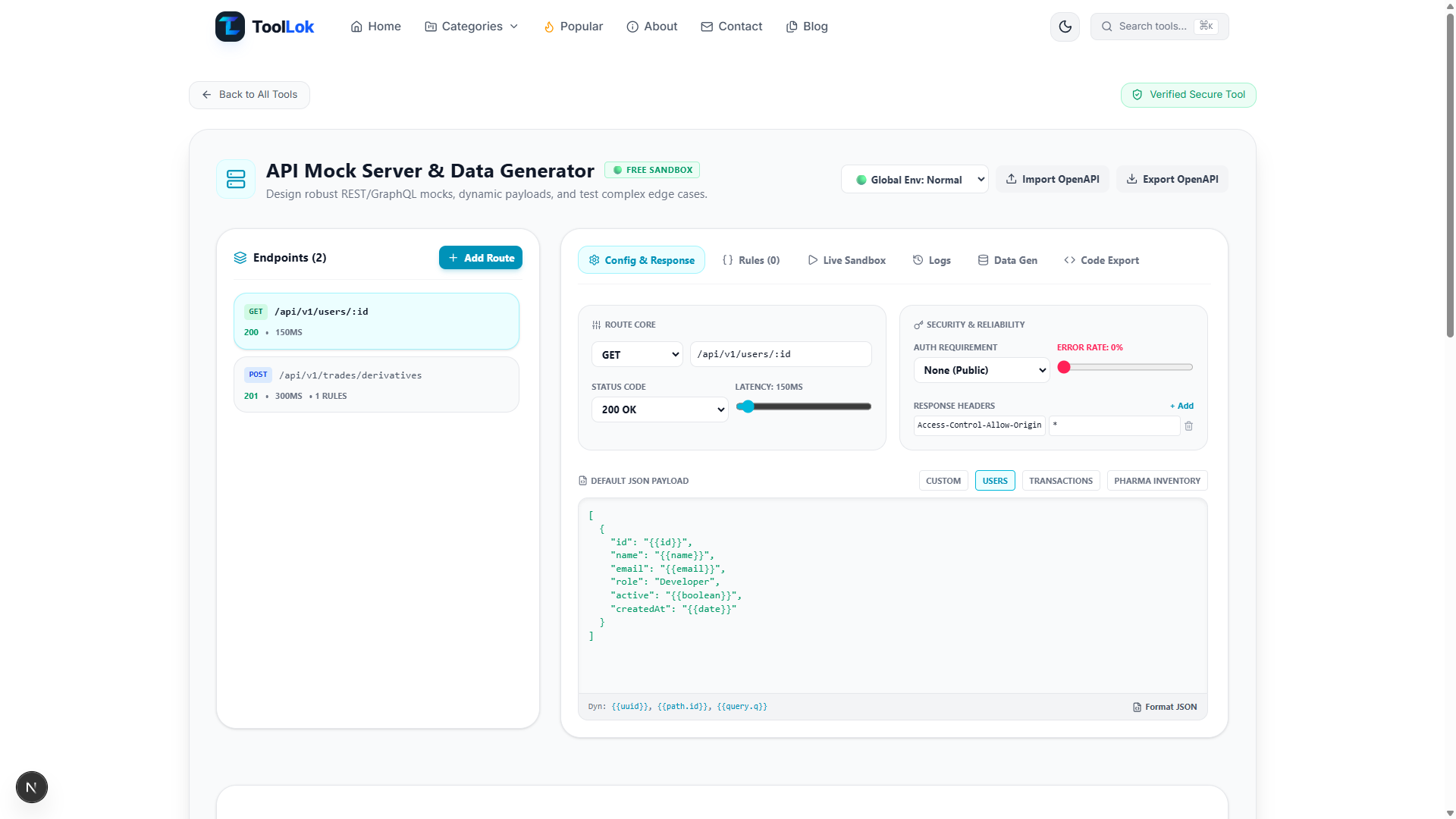
ToolLok's API Mock Server & Data Generator is a browser-based developer tool designed to help developers create configurable mock API endpoints, generate synthetic JSON data, simulate realistic API conditions, test requests, and export or import API definitions.
The tool lets you configure endpoints with HTTP methods, custom paths, status codes, response latency, headers, authentication requirements, error rates, and JSON response payloads. You can also create conditional response rules, test requests inside the sandbox, inspect request history, generate synthetic datasets, and export API configurations as OpenAPI.
Important: Use mock and synthetic data when testing applications. Do not place real production credentials, private API keys, sensitive customer information, or confidential business data into test configurations.
What Is an API Mock Server?
An API mock server is a development environment that imitates the behavior of a real API. Instead of connecting your application to a production backend, you can create simulated endpoints that return predefined or dynamically generated responses.
Mock APIs are useful when the backend is still being developed, when frontend developers need predictable responses, or when you want to test how an application behaves under different API conditions.
A mock endpoint can represent a resource such as users, products, transactions, orders, authentication responses, or other application data. You can control the request path, HTTP method, response status, response body, headers, latency, and authentication behavior.
Why Use an API Mock Server?
API mocking can make development and testing faster because frontend and backend work can happen independently. Developers can build UI components against predictable API responses before the production API is available.
- Develop frontend applications before the real backend is complete.
- Test different HTTP status codes and response payloads.
- Simulate API latency and unreliable network conditions.
- Test authentication-required endpoints.
- Generate realistic synthetic JSON data for development.
- Experiment with API request and response behavior.
- Import existing OpenAPI definitions.
- Export configured mock endpoints as an OpenAPI document.
What Can You Configure in ToolLok's API Mock Server?
The ToolLok API Mock Server & Data Generator provides several configuration options for creating realistic API scenarios. Each endpoint can be configured independently so you can model different API behaviors inside the same sandbox.
1. HTTP Methods
You can create endpoints using common API request methods such as GET, POST, PUT, PATCH, and DELETE. The tool also provides a GRAPHQL method option for API experimentation.
2. Custom API Paths
Define custom API routes such as:
/api/v1/users/:idParameterized paths can be matched against request paths, allowing you to test endpoints that contain dynamic values. The sandbox route-matching engine evaluates exact and parameterized path segments.
3. HTTP Status Codes
Configure the response status code returned by an endpoint. This is useful when testing how an application handles successful responses as well as failure conditions.
For example:
200 OK
201 Created
400 Bad Request
401 Unauthorized
404 Not Found
500 Internal Server Error
4. Response Latency Simulation
Real applications rarely respond instantly. Network delays and backend processing time can affect the user experience. ToolLok lets you configure endpoint latency so you can test how your application behaves when an API response takes longer than expected.
5. Custom JSON Responses
You can define custom JSON payloads for your mock endpoints. This makes it possible to reproduce different API response structures while developing frontend components.
Example mock response:
{
  "id": 42,
  "name": "Alice",
  "email": "alice@example.com",
  "active": true
}
The tool also provides JSON formatting and validation so malformed response data can be identified during configuration.
Dynamic Mock Data and Template Helpers
ToolLok includes synthetic data helpers that can be used to generate changing values inside mock responses. The implementation includes helpers for values such as UUIDs, IDs, names, companies, email addresses, dates, timestamps, random numbers, and booleans.
For example, a mock response can use dynamic placeholders such as:
{
  "id": "{{uuid}}",
  "name": "{{name}}",
  "email": "{{email}}",
  "createdAt": "{{date}}"
}
Dynamic values are useful when you want your mock API to behave more like an application that returns changing data instead of always returning exactly the same response.
Authentication Simulation
API authentication is an important part of application development. ToolLok allows an endpoint to define authentication requirements including None, Bearer, API Key, and Basic Authentication.
This lets you test application behavior when authentication headers are present or missing. For example, a protected endpoint can return an unauthorized response when the expected authentication information is not supplied.
Authorization: Bearer test-tokenThis is particularly useful for testing login states, protected routes, API clients, and error-handling interfaces.
Simulate API Errors and Unreliable Conditions
Applications should not only be tested against successful API responses. They also need to handle slow responses, failed requests, authentication errors, and unexpected server behavior.
ToolLok includes scenario and error simulation capabilities that allow developers to experiment with conditions such as normal responses, server errors, slow networks, and unauthorized requests.
You can also configure an endpoint's error rate to help test how an application behaves when requests do not always succeed.
Conditional API Response Rules
Real APIs often return different responses depending on the request. ToolLok's rules system lets you create conditions based on request information such as the path, query, header, or body.
Supported condition operators include:
- Equals
- Contains
- Exists
- Regular expression matching
A rule can return a different status code and response payload when its condition is triggered.
For example:
Request:
{
  "amount": 500
}

Condition:
amount exists

Response:
{
  "status": "ACCEPTED"
}
This allows you to test more realistic application flows without creating a separate backend implementation for every test case.
Test APIs Directly in the Live Sandbox
The built-in sandbox allows you to test configured endpoints without leaving the tool. You can select a request method, enter a request path, provide headers or a request body, and inspect the resulting response.
The sandbox is useful for quickly verifying whether your configured route, authentication rules, response payload, and conditions behave as expected.
Request History for Debugging
Testing an API becomes easier when you can review previous requests. ToolLok maintains request history containing information such as the request method, URL, status, latency, response, and request context.
This can help developers understand what happened during sandbox testing and identify incorrect endpoint configurations.
Generate Synthetic JSON Data
Frontend development often requires more than one example record. A single user object may be enough for a simple component, but lists, tables, dashboards, pagination interfaces, and search results often require multiple records.
ToolLok includes a synthetic data generator that can create multiple JSON records from predefined schemas. You can choose a schema and specify the number of records to generate.
This makes it easier to create development datasets for testing UI states and API-driven interfaces without manually writing every object.
OpenAPI Import and Export
OpenAPI can help teams describe and share API structures. ToolLok provides OpenAPI import and export functionality so mock endpoint configurations can work with an existing API definition or be exported for further use.
Export Mock APIs to OpenAPI
Configured endpoints can be exported as an OpenAPI 3.0 document. The generated specification includes paths, HTTP methods, response status codes, and example JSON responses.
Example structure:
{
  "openapi": "3.0.0",
  "info": {
    "title": "ToolLok Mock API Sandbox",
    "version": "1.0.0"
  },
  "paths": {}
}
Import an Existing OpenAPI File
You can also import an OpenAPI definition into the mock server. The implementation accepts JSON OpenAPI files and YAML/YML files, then converts discovered paths and methods into mock endpoints.
This can be useful when your API design already exists and you want to quickly create a testable mock environment from that specification.
Generate Code for Your Mock Endpoint
ToolLok can generate example client code for configured endpoints. This can help developers quickly understand how a mock endpoint can be called from different environments.
Generated examples include formats such as cURL and JavaScript fetch, along with server or mocking-oriented code examples available through the tool's code generation interface.
Example JavaScript request:
fetch("https://mock.toollok.com/api/v1/users/123", {
  method: "GET",
  headers: {
    "Content-Type": "application/json"
  }
})
  .then(res => res.json())
  .then(console.log);
These snippets are useful as starting points when integrating your mock endpoint into a frontend application or testing workflow.
Example: Create a Mock Users API
Let's create a simple users endpoint to understand the workflow.
Step 1: Add an Endpoint
Create a new endpoint and configure the route:
GET /api/v1/users/:idStep 2: Configure the Response
Set the status code to 200 OK and provide a JSON response:
{
  "id": "{{id}}",
  "name": "{{name}}",
  "email": "{{email}}",
  "active": "{{boolean}}"
}
Step 3: Add Latency
Add a small response delay to simulate a real network request. This can help you test loading states and asynchronous UI behavior.
Step 4: Test the Endpoint
Open the sandbox, select the GET method, enter the endpoint path, and run the request. Review the status, latency, response, and request history.
Step 5: Test an Error Case
Change the response configuration or create a conditional rule to simulate an error. Then verify that your frontend displays the correct error state.
API Mocking vs. Building a Real Backend
API mocking does not replace a production backend. Instead, it provides a controlled development environment for testing API-dependent functionality before or independently of the real backend.
- API Mocking: Fast, controlled, predictable development responses.
- Production API: Real business logic, database access, authentication, and production data.
- Mock Data: Safe synthetic data for development and testing.
- Production Data: Real application information that requires appropriate security controls.
A strong development workflow can use mock APIs during early development and integration testing, followed by testing against the real backend before deployment.
Who Can Use an API Mock Server?
An API mocking tool can be useful for many types of developers and teams.
- Frontend developers building API-driven interfaces.
- Backend developers testing endpoint designs.
- Full-stack developers working on complete applications.
- QA engineers testing API-dependent application states.
- Students learning REST APIs and HTTP concepts.
- Developers creating prototypes and proof-of-concept applications.
- Teams working with OpenAPI specifications.
How to Use ToolLok API Mock Server & Data Generator
- Create or select a mock API endpoint.
- Choose the HTTP method and configure the endpoint path.
- Set the response status code and response latency.
- Configure JSON response data or choose a predefined schema.
- Add headers, authentication requirements, or error simulation when needed.
- Create conditional rules for dynamic response behavior.
- Open the sandbox and send a test request.
- Review the response and request history.
- Generate synthetic data when multiple records are required.
- Import or export OpenAPI definitions when working with API specifications.
- Generate client code examples for your configured endpoint.
Best Practices for API Mock Testing
Good mock API design should represent the situations your application is expected to encounter. Do not test only the successful response.
- Test both successful and unsuccessful HTTP responses.
- Test missing or invalid authentication.
- Simulate slow API responses to verify loading states.
- Use realistic synthetic data instead of production information.
- Test empty arrays and missing data states.
- Test malformed or unexpected responses where appropriate.
- Use conditional rules for important application scenarios.
- Review request history when debugging mock behavior.
- Keep mock API structures aligned with your intended API contract.
Why ToolLok API Mock Server Is Useful for Frontend Development
Frontend developers frequently need API data before backend services are completely ready. A configurable mock environment removes that dependency and allows UI development to continue using predictable responses.
You can create users, transactions, custom responses, authentication states, errors, delays, and other API scenarios to test components under different conditions.
Because the tool combines endpoint configuration, sandbox testing, synthetic data generation, OpenAPI workflows, and code generation in one interface, it can serve as a convenient development utility for API experimentation and frontend testing.
Frequently Used API Mocking Scenarios
Here are some practical situations where a mock API can save development time:
- Testing a user dashboard before the backend is ready.
- Testing loading spinners with simulated latency.
- Testing unauthorized pages with authentication requirements.
- Testing server-error components using simulated error responses.
- Generating large collections of synthetic users or transactions.
- Testing dynamic URL parameters such as user IDs.
- Testing conditional API responses.
- Creating a quick prototype from an OpenAPI definition.
Conclusion
An API mock server can significantly simplify application development by providing predictable API behavior before a production backend is ready. It can also help developers test loading states, authentication failures, server errors, dynamic responses, and different data conditions.
ToolLok's API Mock Server & Data Generator combines endpoint configuration, custom JSON responses, latency simulation, authentication checks, conditional rules, request testing, request history, synthetic data generation, code generation, and OpenAPI import/export in one developer-focused environment.
If you are building a frontend, testing an API workflow, experimenting with API contracts, or generating development data, try the ToolLok API Mock Server & Data Generator to create and test your mock API scenarios.
Start building your mock API with ToolLok →